 ×
×

Official User Guide
Filmmaker User Guide.
June 2026
Raindance Releasing is powered by Hiway, the new streaming solution to give filmmakers what they always wanted. Control over your own story. Access to your own fan data. And money in your pocket directly, every time someone pays to watch your film.
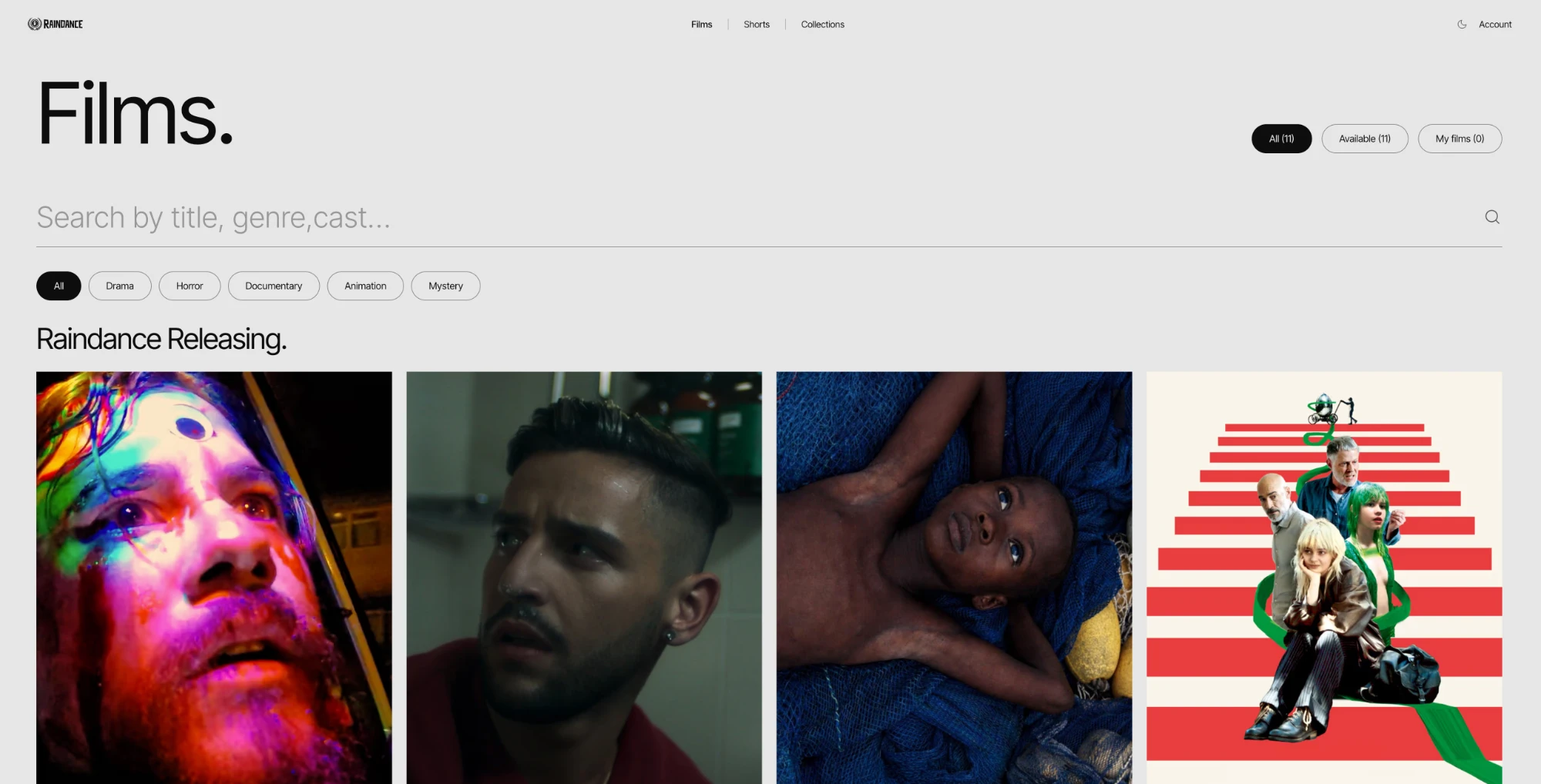
What you get on Raindance Releasing
- A direct line to audiences who want to watch independent film.
- Your share of every rental, paid into your bank straight away.
- A home for your film all year round, curated by Raindance.
Hiway is the technology behind it all. Your film stays yours. Your fans are yours. Your money is yours.
In this guide you will
- Set up your Hiway account.
- Upload your film and add the details about it.
- Send it to Raindance Releasing so people can watch and pay.
- See who is watching, where, and how much you have made.
- Share your film anywhere else you choose.
What's Hiway, exactly.
Hiway in one minute
Hiway is one simple place to do everything with your film. No more drives, screeners and uploads scattered everywhere.
From one login, you can:
- Keep your film in one safe place that you own.
- Share it with anyone using a single link.
- Charge people to rent or buy it.
- See who is watching and how much you have earned.
- Get paid straight into your bank, no middlemen.
Hiway is not a streaming service like Netflix.
It is the technology behind Raindance Releasing. You stay in the driving seat.
- Your film stays yours.
- Your fan data stays yours.
- Your money lands in your bank, every time.
No more chasing payments. No more guessing who watched. No more handing your film over and hoping for the best. One link does everything.
Set up your account.
Click the button below to set up your account. The link tells Hiway you came from Raindance so you get connected to Raindance Releasing straight away.
Create your Hiway accountStep 1 · Sign up
- Sign in with your email or your Google account.
- If you use email, we send you a code. Type it in within 10 minutes.
- Add your name or company name, a logo, and a short description. This is what people see when they land on your film.
Step 2 · Pick a plan
You only need to pay if you are uploading your own film. Annual billing works out at about two months free.
Solo
For one filmmaker or student.
£12/mo
or £120/year
Studio
For small teams.
£60/mo
or £600/year
Premiere
For multiple films.
£185/mo
or £1,850/year
Step 3 · Connect Stripe so you get paid
Stripe is the company that handles the money. When a fan rents your film, Stripe takes the payment and sends your share to your bank.
Go to Settings › Monetisation › Connect Stripe and follow the steps. You will need your business details, an ID for verification, and your bank account number.
You have to connect Stripe before you can charge for your film or send it to Raindance Releasing. Otherwise there is no way for the money to reach you.
Upload your film.
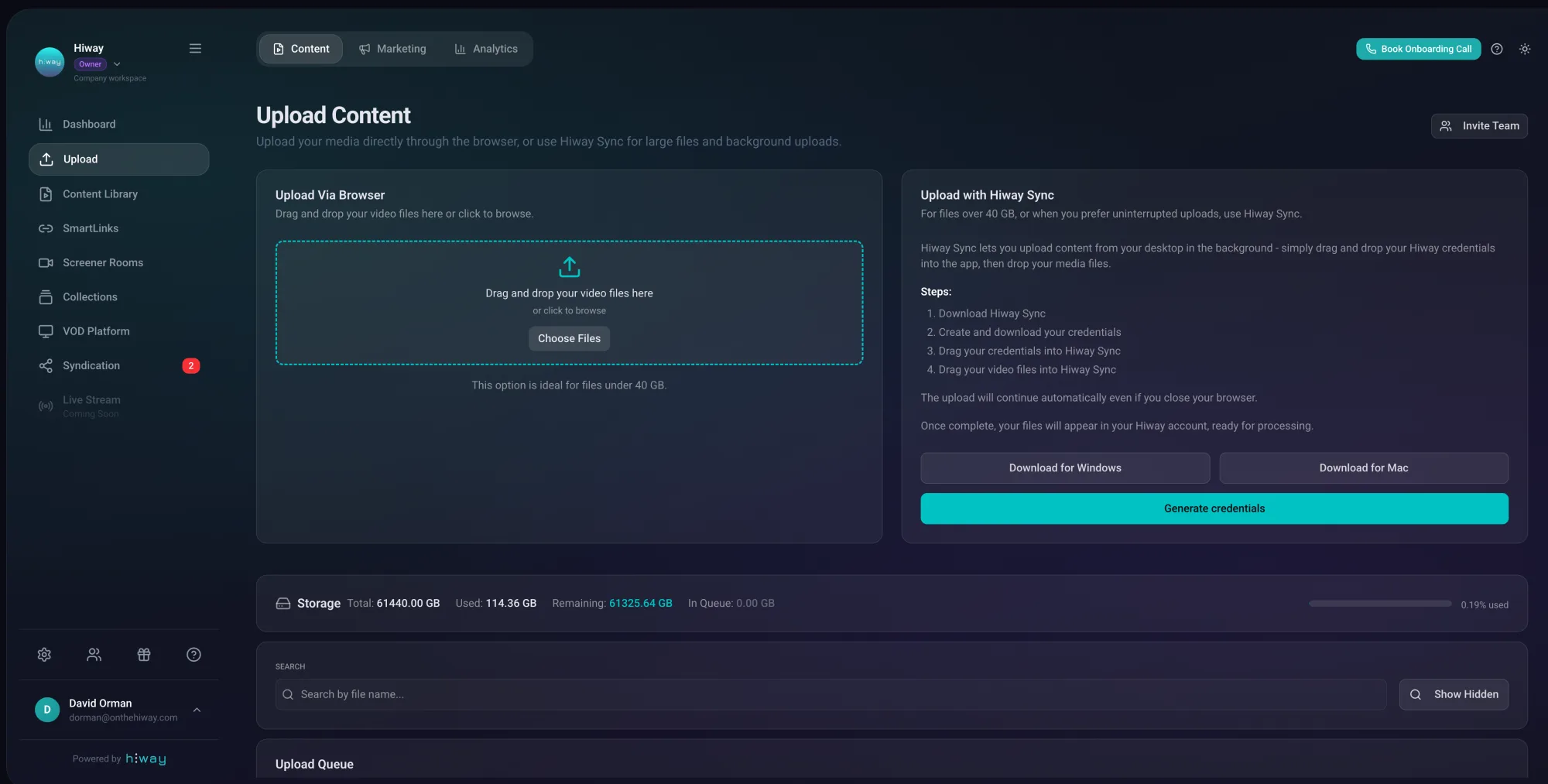
Upload your film once. After that, you can share it in lots of different ways from the same file. There is no need to upload it again.
Option A · Upload through your browser (good for files up to 40GB)
- 1
Click Upload on the left. Drag your film file into the box or click to find it on your computer.
- 2
Type in the title, what the film is about, the genre, when it came out, and who made it. Add a few tags so it is easy to find later.
- 3
Click Accept and Complete. You can close the tab once it has started. The upload will finish on its own.
- 4
Wait until you see Ready next to the film. That means it is good to go.
Uploads take a bit longer than YouTube because Hiway checks every file for safety. That is normal.
Option B · Use Hiway Sync (for big files over 40GB or lots of files)
Hiway Sync is a small app that runs on your computer. It uploads in the background, so it does not matter if you close your browser or your internet drops for a minute.
- 1
On the Upload page, download Hiway Sync. There is a version for Windows and one for Mac.
- 2
Back in Hiway, click to get your "credentials file". This is a small file that tells Hiway Sync who you are.
- 3
Open Hiway Sync. Drag your credentials file in. Then drag your film file in.
- 4
Click Upload. Leave it running. You can use your computer for other things while it does its thing.
Upload once, share lots of ways
From the same film file you can create:
- A free trailer anyone can watch.
- A paid version where fans pay to watch.
- A private link for press, funders or sales agents.
- A version that appears on Raindance Releasing.
All from one upload. You never have to do it again.
Add the details about your film.
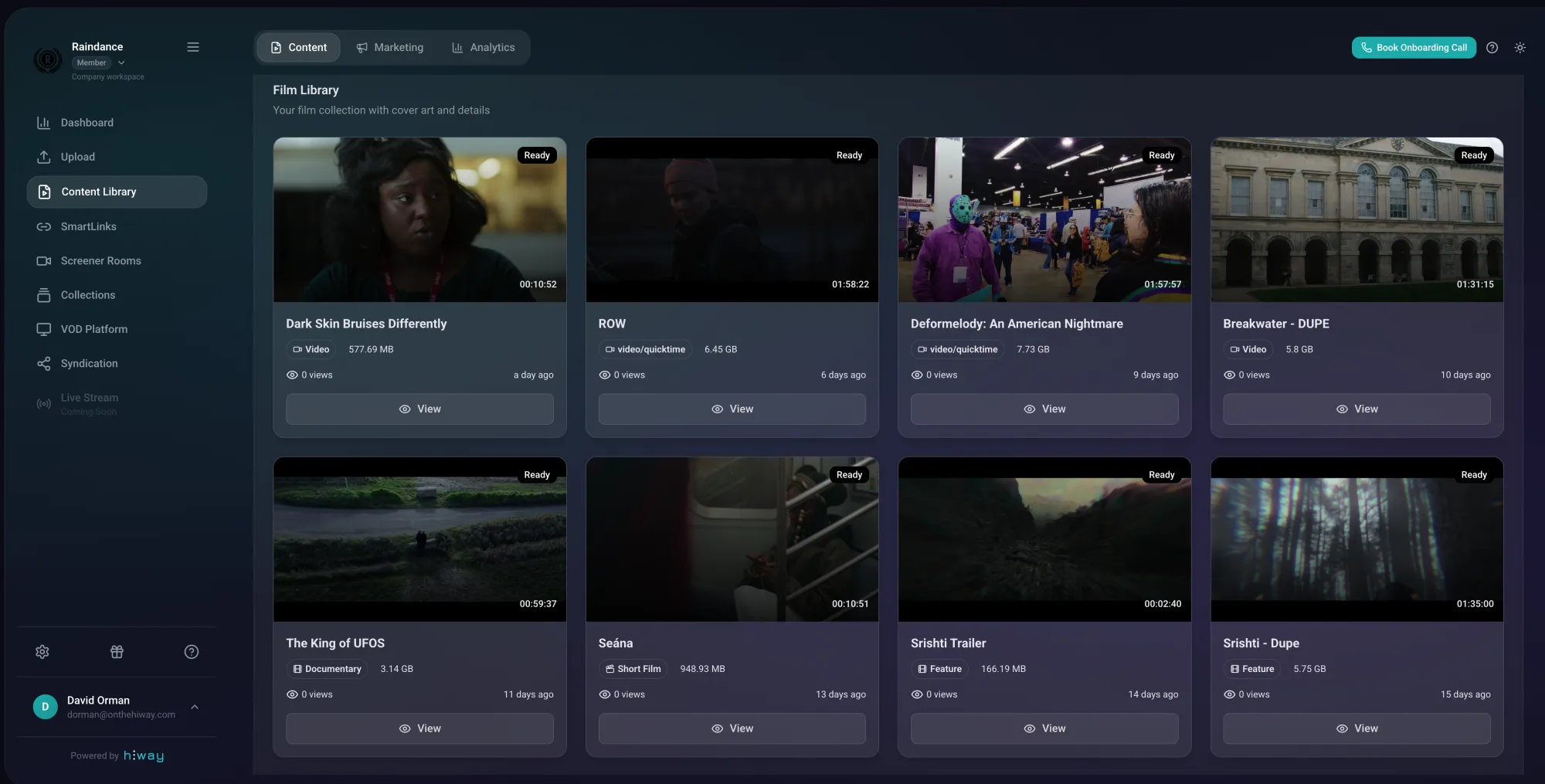
Go to Content Library, click on your film, then click Edit. You only need to do this once.
Step 1 · The basics about your film
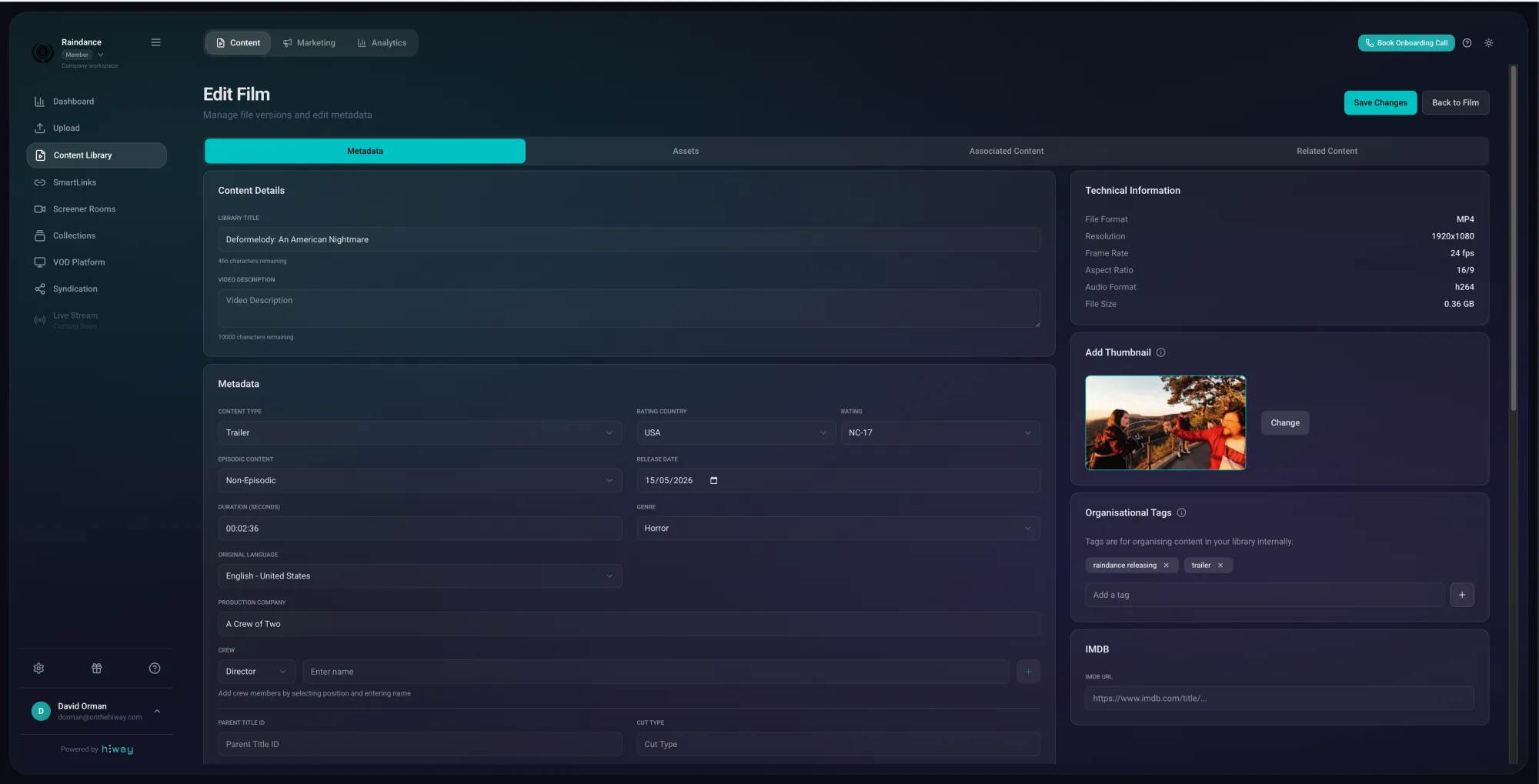
Tell Hiway about your film. The more you add, the better it looks on your film page and the easier it is for fans to find:
- The title, a description and what kind of film it is (feature, doc, short).
- Genre, language, country, year it came out, and an age rating.
- The production company. A few tags so people can find it (like "thriller" or "Berlin").
- If it is a series, turn on "Episodic" and add the season and episode numbers.
Step 2 · Add the cast and crew
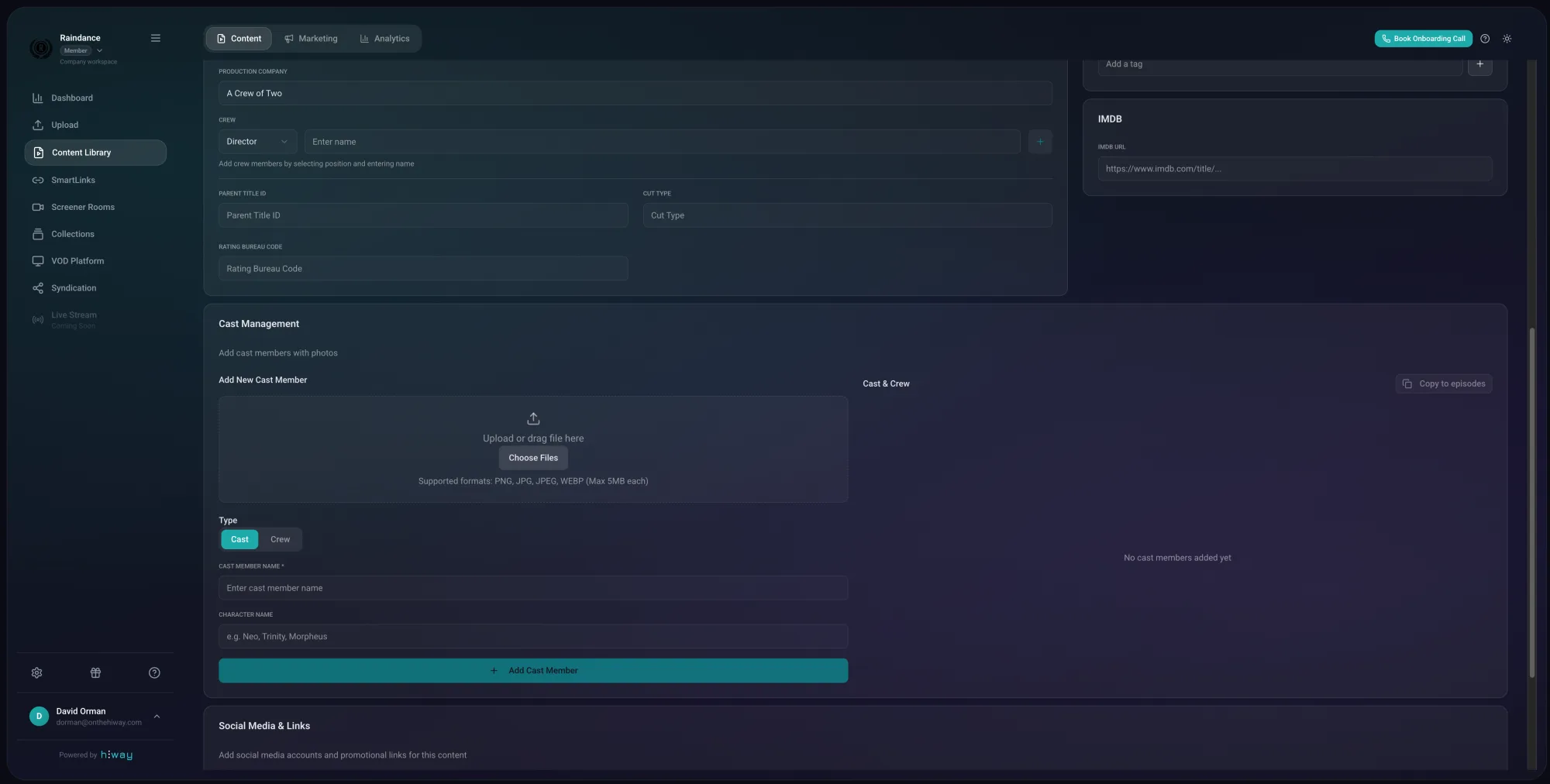
Add the people who made your film. Director, producer, writer, editor and so on. Each one gets their own line with their role next to their name.
Don't forget to press Enter after each name. If you skip this, the name does not save.
For cast: drag in a photo, type the name, then type the character they play. Put the biggest stars first, because that is the order people see on your film page.
Step 3 · Add posters and pictures
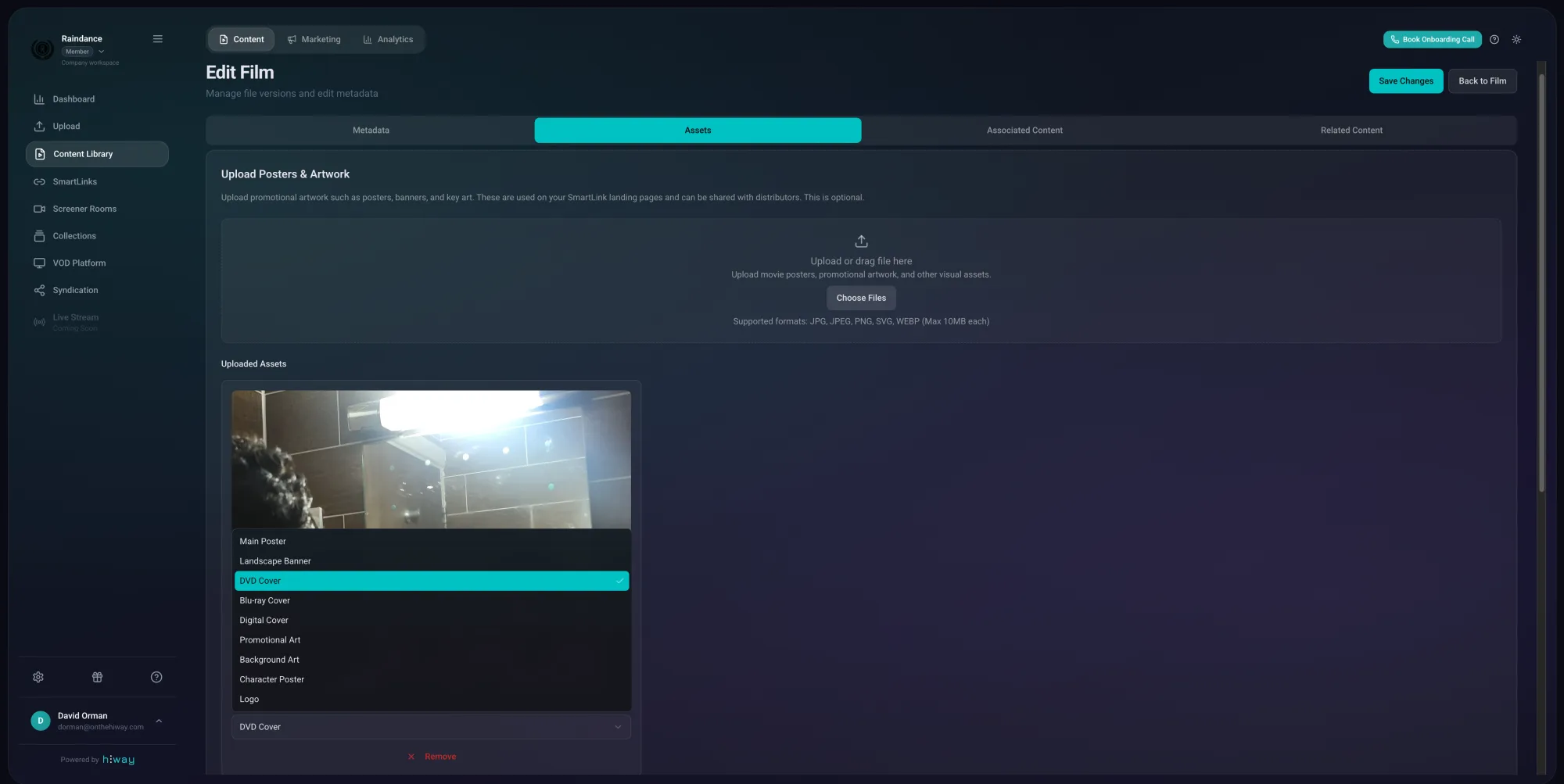
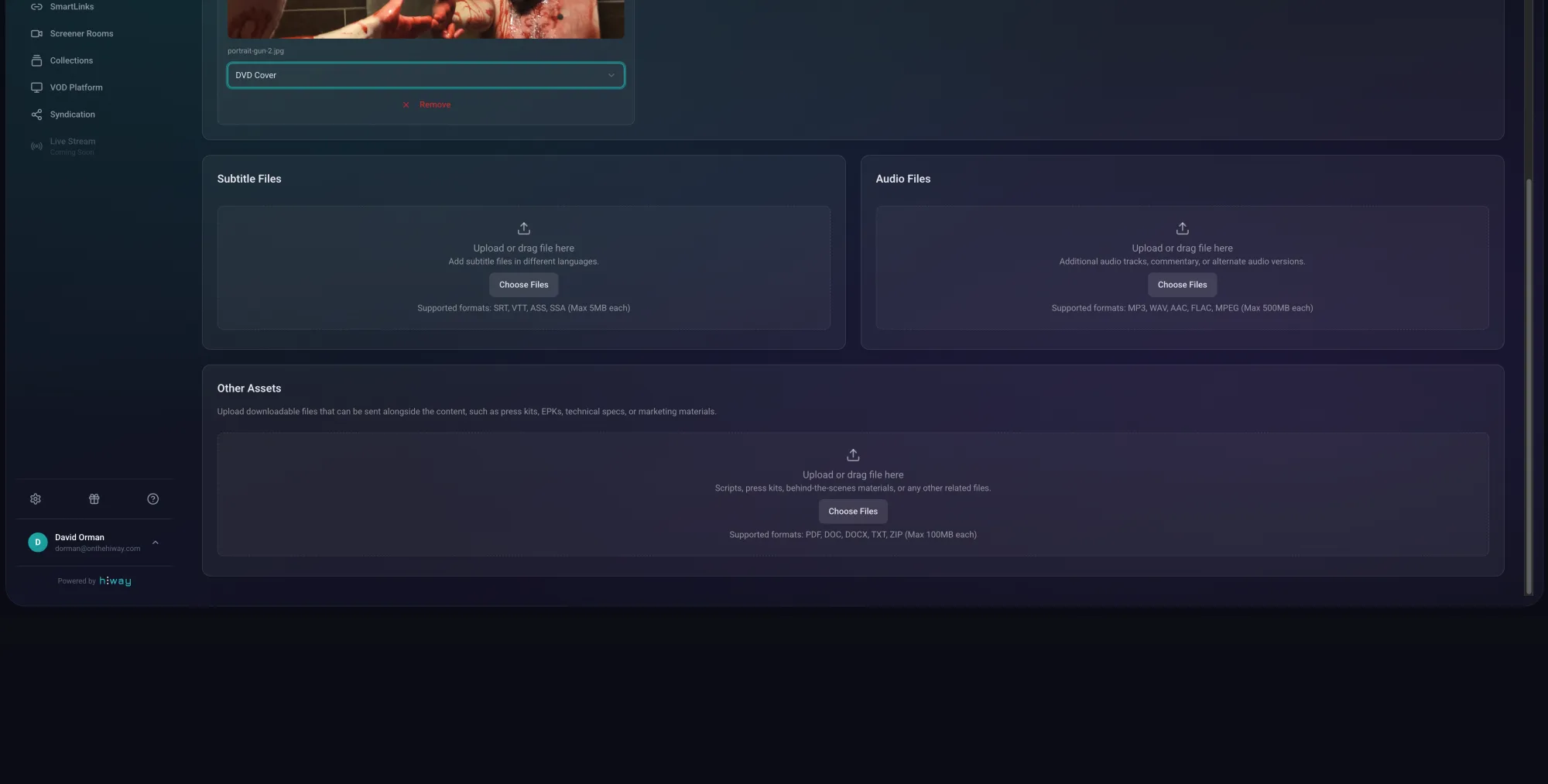
Click the Assets tab. Drag in your poster, stills and any artwork you have. Give each picture a label so you know what is what. Click Save.
Hiway also makes some thumbnails from your film automatically. You can pick one of those or upload your own from Metadata › Thumbnail.
Step 4 · Add subtitles
You can add as many subtitle tracks as you want. They need to be SRT files (the standard subtitle format).
- 1
In the Assets tab, find the Subtitles section and click Add Subtitle.
- 2
Upload your SRT file, pick the language, and type a label (this is what viewers see on the subtitles button).
- 3
Turn on Set as Default if you want this one to come on automatically.
- 4
Do the same for any other languages, then click Save.
Make your share links.
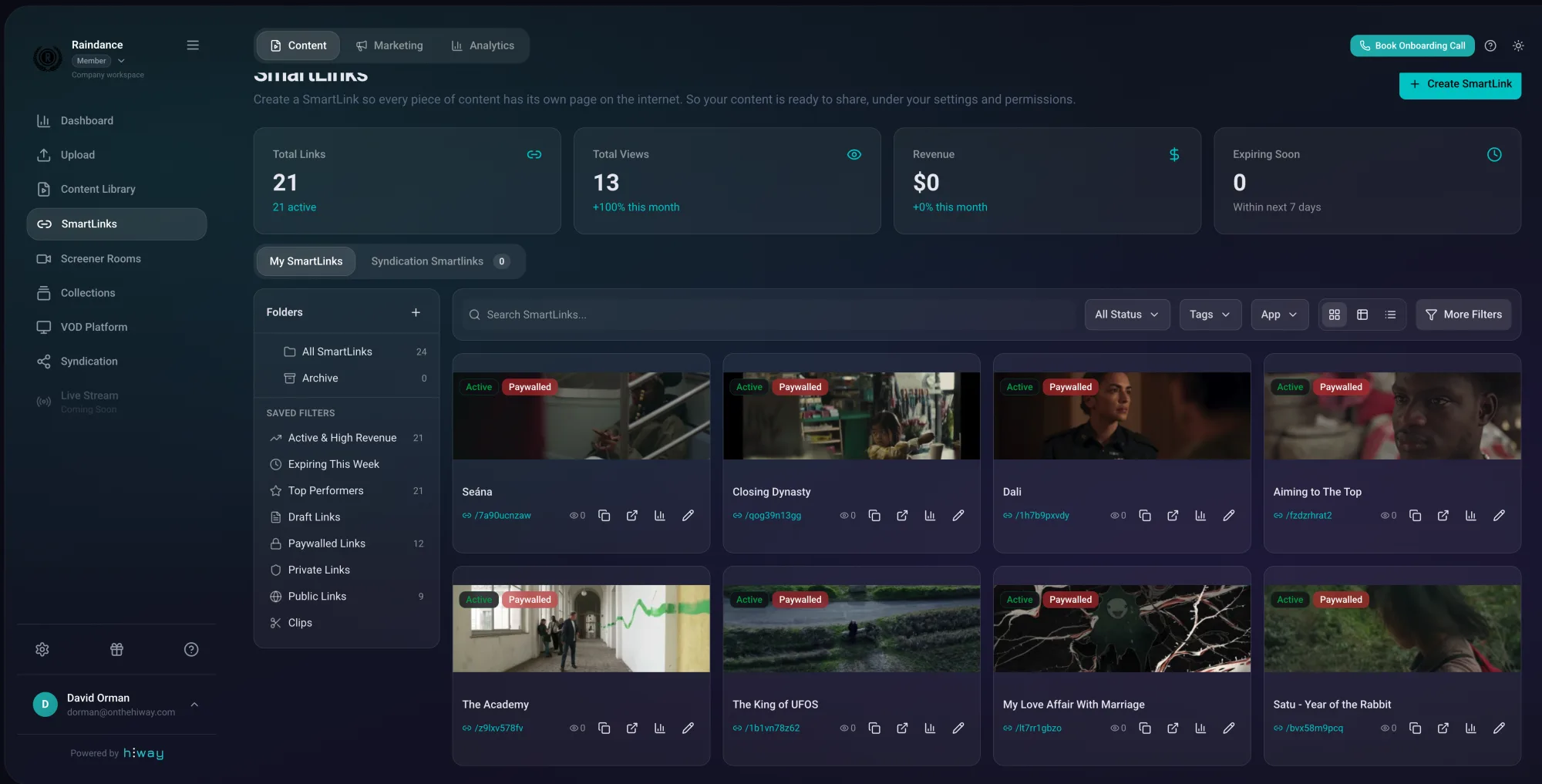
A SmartLink is just a clever link to your film. Send the link to anyone. They click it, they watch. You can make as many SmartLinks as you want from the same film, each one set up differently. A free trailer for everyone, a paid version for fans, a private version for press, and so on.
Make a free trailer link
This one is for everyone. Anyone with the link can watch the trailer for free.
- 1
Go to SmartLinks. Click Create SmartLink, then choose Share with Everyone.
- 2
Give it a name (like "My Film, Trailer"). Pick your trailer file. Tick the pictures you want on the page.
- 3
Click Publish. Copy the link. Now you can send it to anyone or post it on social media.
Make a paid link (the one that earns you money)
This is the link people pay to watch. Set the price and the regions, and you are open for business.
- 1
Go to SmartLinks. Click Create SmartLink, then choose Paywall Your Content.
- 2
Pick your film. Set access to View Only so people can watch but not download.
- 3
Choose how much to charge. You can have a "buy to keep" price and a cheaper "rent" price. For example, £9.99 to buy, £4.99 to rent.
- 4
Pick the countries where people can watch. You can make it available everywhere or just a few places.
- 5
Click Publish. Your film is now on sale.
Make your film page look great
Open your SmartLink and click Edit to make the page your own:
- Choose a hero image, write a short tagline, add your logo to the player.
- Connect your trailer and paid links. People watching the trailer can click straight through to buy.
- Drop the player straight into your own website using an embed code.
Remember: you need Stripe connected (Step 3 above) before you can charge for your film.
Get your film on Raindance Releasing.
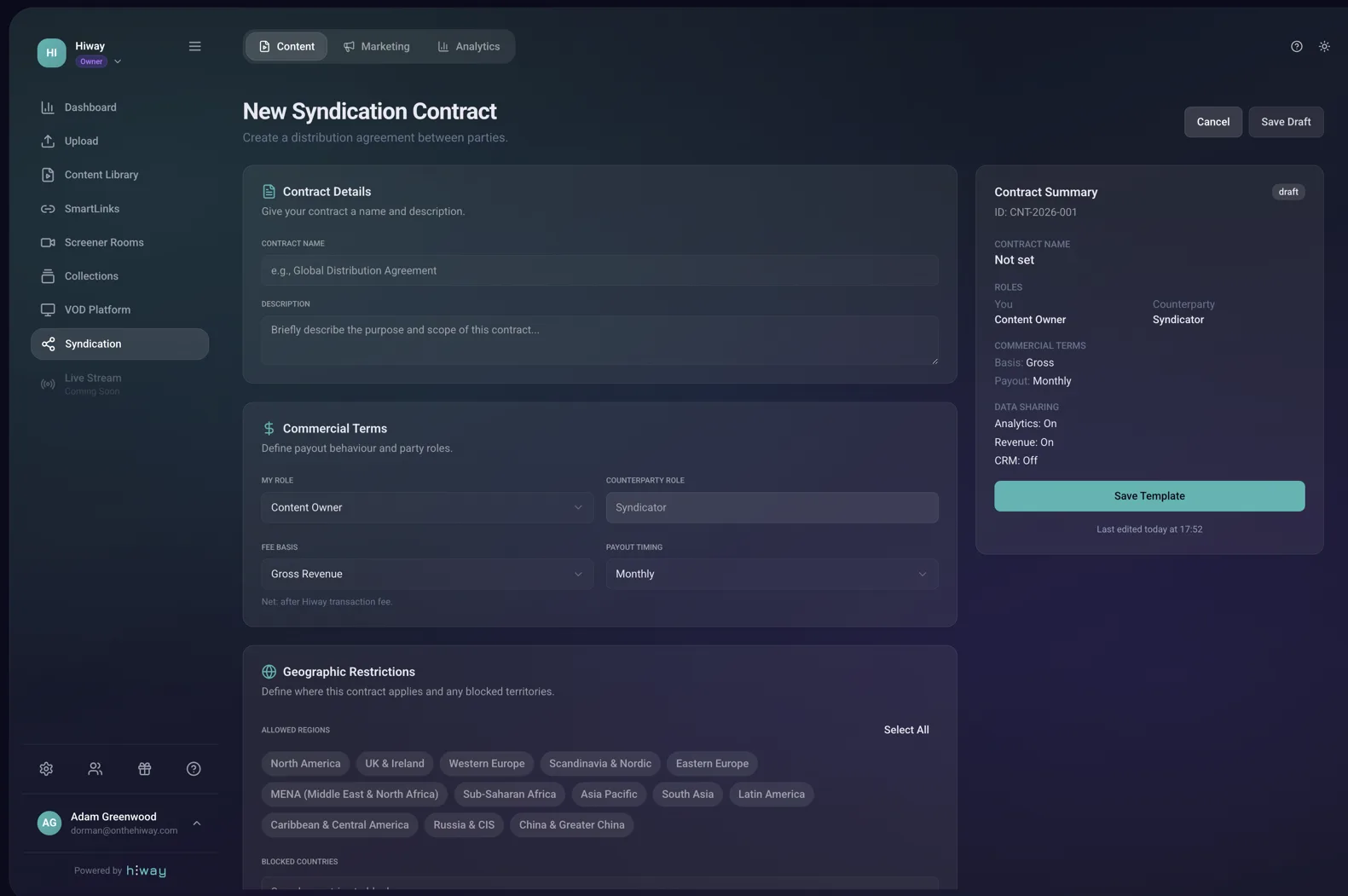
Here is the clever bit. To put your film on Raindance Releasing, you don't upload it again. The film stays in your Hiway account. Raindance just plays it from there. You stay in control. They get a great film to show.
Getting your film on the platform happens through a Raindance Releasing Syndication Agreement. There are two ways to start. Either way, it's the same agreement and the same process for getting your film onto the Raindance Releasing platform.
First, get your film ready
Before you start either option, your film needs to be fully prepared in your Hiway account. Without this, the agreement won't have anything to point at. Check off the list below:
- Your feature film is uploaded and shows Ready in your Content Library (Section 3).
- Your trailer is uploaded as a separate file too (so you can send both to Raindance).
- All the metadata is filled in: title, description, genre, cast and crew (Section 4).
- Your posters, stills and subtitles are uploaded in the Assets tab.
- Stripe is connected (Section 2, Step 3) so the money can land in your bank.
Option A · You've already received a Syndication Agreement
Raindance has sent the agreement to you through Hiway. You will have an email about it. Open it, check the film and trailer are linked, read the terms, and click Approve.
- 1
Go to Syndication › Shared With Me in your Hiway dashboard.
- 2
Open the agreement. Check it covers both your feature film and your trailer.
- 3
Read through the terms (see below).
- 4
Happy? Click Approve. The agreement is live.
Option B · Send Raindance your syndication agreement
You haven't received one yet, so you create it and send it to them. Email Ed at ed@raindance.co.uk first if you want him to send you the template, or build it yourself with the wizard below.
In your Hiway dashboard, click Syndication in the sidebar, then Create. The wizard walks you through seven steps:
- 1
Basics
Give the contract a name (e.g. "Raindance Releasing — [your film name]"). Add a short description if you want. Set the start date (today, or any future date). Leave the expiry toggle off if you want it to run until either side ends it.
- 2
Geographies
Pick where Raindance can show your film. Choose All regions for worldwide, or click Select regions to choose specific ones. You can also click on individual countries inside a region to exclude them.
- 3
Media
Pick the films this contract covers. You will see your whole library as a list with a checkbox next to each item.
Tick the box for both your feature film and your trailer. Raindance needs both to put your film on the platform.
- 4
Pricing
Set the rental price for your film (e.g. £7.99). Pick GBP as the currency. Pick Fixed for a single price, or Floor / Ceiling if you want to let fans pay between two amounts. You can also click Add country override to set different prices in different markets.
- 5
Permissions
This is the money and data sharing step.
- Your split (%): enter 70. That gives Raindance 30%.
- Revenue basis: Gross.
- Payout timing: Monthly.
- Share with counterparty: turn on all three (View analytics, Revenue analytics, CRM data). This lets Raindance see what's happening on their side.
- 6
Recipient
This is who receives the contract.
Click the Manual entry tab (not "From CRM"), then type ed@raindance.co.uk into the email box.
Leave the email subject and message as they are, or add a personal note if you want.
- 7
Review & send
Check the summary card on the right side of the screen. Make sure the basics, media, pricing, permissions and recipient all look right. Click Send. Ed gets the contract in his Hiway account.
What's in the agreement (same for both options)
- Money split: 70% to you, 30% to Raindance.
- Media covered: your feature film and your trailer.
- Territories: the countries where Raindance can show your film. Usually worldwide, but you can carve out countries you want to keep for other deals.
- Price: what fans pay to rent.
- Data sharing: turned on so both you and Raindance can see analytics, customer details and revenue.
What happens next
- 1
Once both sides approve the agreement, Raindance watches your film and adds it to the platform.
- 2
Your film goes live on Raindance Releasing within a few working days.
- 3
Fans can rent it. Money starts flowing to your bank. You can track everything from your dashboard.
Raindance curates the platform. They might not accept every film. If they pass, you still keep your Hiway account and your film, and can use it anywhere else.
Even when your film is on Raindance Releasing
- Your film stays yours. The actual file never leaves your Hiway account.
- You see who's watching, where they're watching from, and for how long.
- When someone pays, your share lands in your bank account the same day.
- If you change your mind, you can pull your film off the platform with one click.
How you make money.
When someone pays to rent your film on Raindance Releasing, here is exactly what happens to that money. Hiway takes a small fee. Raindance gets their share. The rest is yours, paid into your bank straight away.
70%
Goes to you, the filmmaker
30%
Goes to Raindance
Same day
Money in your bank
How rentals work
When a fan rents your film, you decide the rules. Set them once in Settings › Monetisation:
- How long they have the film for. Most people pick 7 days.
- How long they have to finish watching once they press play. Most pick 48 hours.
- How many times they can watch. Most leave this as "as many times as you like".
Charge different prices in different countries
In the film page editor, look for "Regional Pricing". You can charge less in some countries and more in others, all in the local currency. Save when you are done.
Run a discount for fans
Want to do a launch offer? Settings › Monetisation › Discount Codes. Create a code (like LAUNCH50) and decide if it gives a percentage off or a fixed amount off. You can also choose how many people can use it and when it expires.
See who's watching.
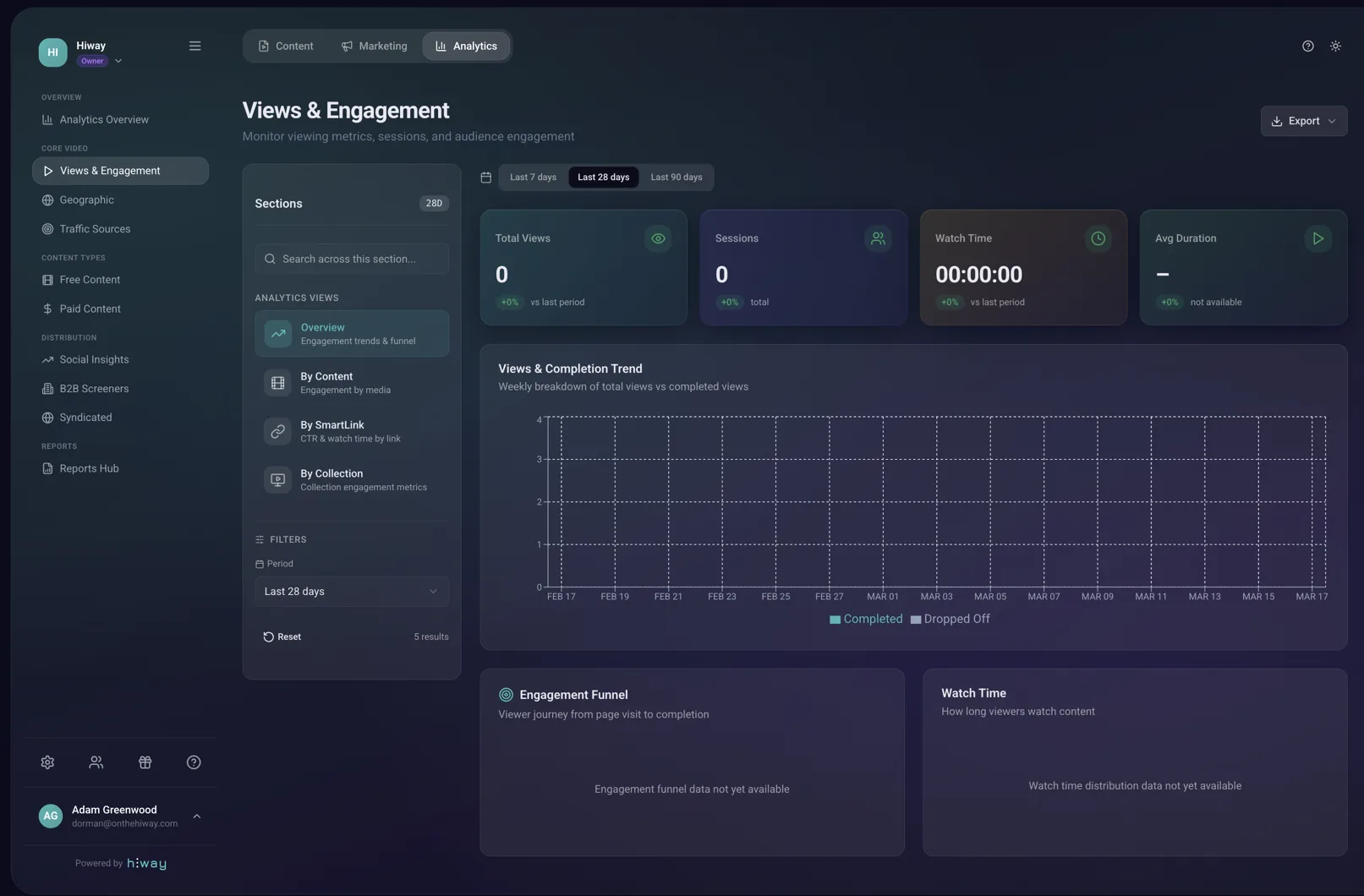
Open your dashboard and you see everything as it happens. Who watched, what they watched, where they were, and how much you have made. No waiting for a quarterly report. No guessing. Just real numbers in real time.
What you can see
- How much money you have made.
- How many people watched and how much they watched.
- How big your audience is and how many came back.
- Which countries your fans are watching from.
- Whether they are on a phone, tablet, laptop or TV.
- Which links are bringing in the most views and which channels they came from.
All of this is yours. Download it any time. Use it for your next film.
Share your film anywhere else.
Raindance Releasing is one place to show your film. You can keep showing it anywhere else too. Same film, same upload, lots of different ways to reach fans.
Ways to share
- Put the player on your own website. People can buy your film without leaving your site.
- Email your fans with a personal note and the link.
- Post on Instagram, TikTok, X, LinkedIn, Facebook, Discord, Reddit, or wherever your people are.
- Send a private link to journalists, funders, festivals or sales agents.
Filmmakers helping filmmakers
Every filmmaker on Raindance Releasing gets a special "share to earn" link. If you share another filmmaker's film and someone buys it, you get 20% of what they paid. They can do the same for your film. Everybody wins.
- Pick any film on Raindance Releasing you love.
- Click Share to earn and post the link wherever your fans hang out.
- When somebody buys, your 20% lands in your bank the same day.
Support
Need a hand?
Stuck on something or just want a chat? Here is who to email.
For Hiway help
Anything about your account, uploading, setting up Stripe, your film page or your numbers.
support@onthehiway.comFor Raindance help
Anything about submitting your film, curation, or the Raindance partnership.
submissions@raindance.co.ukReady to get started?
Set up your account now. It takes a few minutes.